


Google Shopping Ads in Lithuania: A Comprehensive Guide for E-commerce Businesses

Google has officially confirmed the expansion of the Google Shopping Ads advertising format across Europe. In the near future, Shopping Ads will be launched in 15 additional markets, including Lithuania. The rollout is planned in two phases, strategically aligned with the most important retail seasons. The first phase covers smaller markets ahead of the back-to-school period, while the second phase targets a larger region, including Lithuania, coinciding with the year’s biggest sales peak — the holiday shopping season.
As Google Shopping Ads approaches its launch in Lithuania, the e-commerce market is entering a new phase. Until now, most e-commerce advertising in Lithuania has been driven by text-based search ads or visual communication on social media platforms. However, with Google Shopping Ads, consumers can instantly see specific product offers, including prices, visuals, and sellers, all in one place. This means that purchasing decisions are often made before a user even visits your website.
This shift significantly increases competition among e-commerce players, as products are placed in a direct price and offer comparison environment. Competitive advantage will belong not only to those with the largest budgets, but to those who are best prepared — businesses with well-structured product data, a clear value proposition, and a seamless purchasing experience.
In other words, Google Shopping Ads is not just an advertising format — it is a data-driven sales system where success depends less on ad copy or creative assets, and more on product data quality, pricing strategy, and technical readiness. That is exactly why businesses looking to capitalize on this opportunity should begin preparing well before the official launch in Lithuania.
In this article, we will explore in detail:
- What Google Shopping Ads are and how they work;
- The real value they create for e-commerce businesses;
- What Google Merchant Center is and why it is essential;
- The specific steps you need to take before launching in Lithuania;
- The most common mistakes that cost time and money.
What Are Google Shopping Ads and How Do They Work?
Google Shopping Ads are product-based advertisements displayed directly within Google search results, typically at the top of the page or within a dedicated product carousel. It is important to emphasize that these ads often occupy the most visible positions — above organic (SEO) results and often even ahead of some other paid ads — making them the first point of contact with consumers during their search journey. They are designed to allow users to compare different offers within seconds and make faster purchasing decisions.
Unlike traditional text-based ads, which rely on keywords and short descriptions, Shopping Ads are visually and data-driven. They present all essential product information before the user even clicks, including:
- Product image
- Price
- Seller (brand or e-commerce store)
- Ratings and reviews (if integrated)
Unlike traditional search ads, where users first click a link and only then evaluate the offer, part of the purchasing decision with Shopping Ads happens before the click. This means consumers can already assess within the search results whether the product appeals to them visually, whether the price meets their expectations, and whether the seller appears trustworthy.
For this reason, Shopping Ads not only capture attention first, but often actively shape consumer choice before users even reach organic SEO results or other paid advertisements.
Why Are Google Shopping Ads Critically Important for E-commerce?
Google Shopping Ads is considered one of the most effective forms of e-commerce advertising, primarily because it delivers high-quality traffic. Unlike social media platforms or some traditional search ads, Google Shopping Ads reaches users who already have clear purchase intent. These consumers are actively searching for a specific product or solution, which significantly increases the likelihood of conversion.
Second, this channel provides a strong visual competitive advantage. Since the product is displayed before the click, visual presentation becomes a critical factor. Better product images generate more clicks, while clearer and more attractive offers drive more sales. In this context, visuals are not just an additional element — they are one of the core sales drivers.
Third, Google Shopping Ads creates transparent price competition. Essentially, it functions as a mini price-comparison platform where users can view multiple sellers simultaneously. This environment pushes businesses to continuously optimize pricing strategies, improve offers, and invest in better product presentation and data quality.
Finally, this channel offers strong automation and scalability potential. Shopping Ads is deeply integrated with Google Ads solutions such as Performance Max, allowing businesses to automate campaign management, optimize results based on data, and scale sales performance efficiently.
What Is Google Merchant Center and Why Is It So Important?
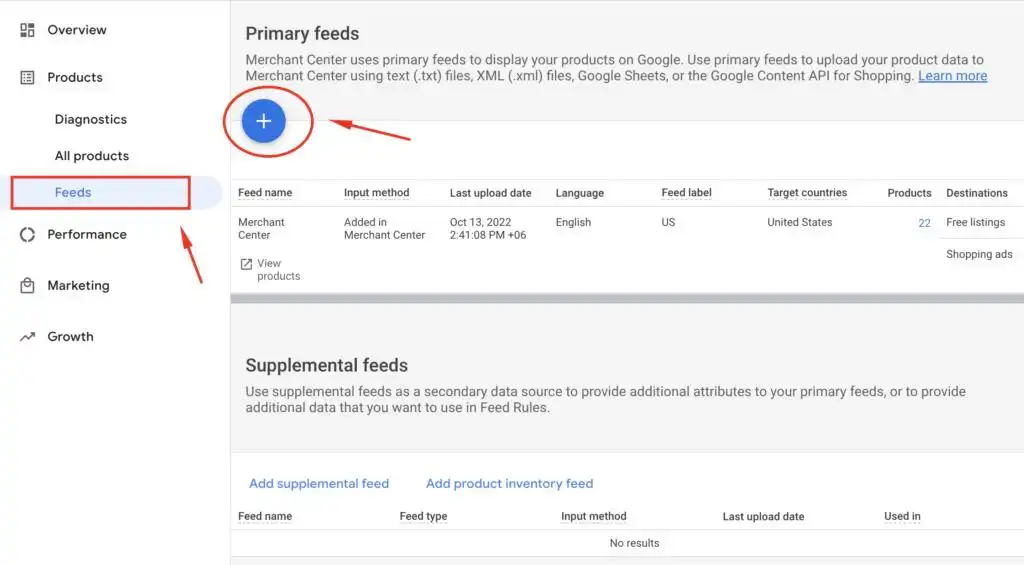
The Google Shopping Ads system operates fundamentally differently from most other advertising formats — ads are not created manually. Instead, the entire process is driven by product data stored within the Google Merchant Center platform. This is where your product catalog (feed) is hosted, containing all essential product information, including titles, prices, images, descriptions, and availability.
Importantly, before your ads can start running, your Merchant Center account must be approved by Google. This includes verification of your website, business information, and compliance with Google’s policies.
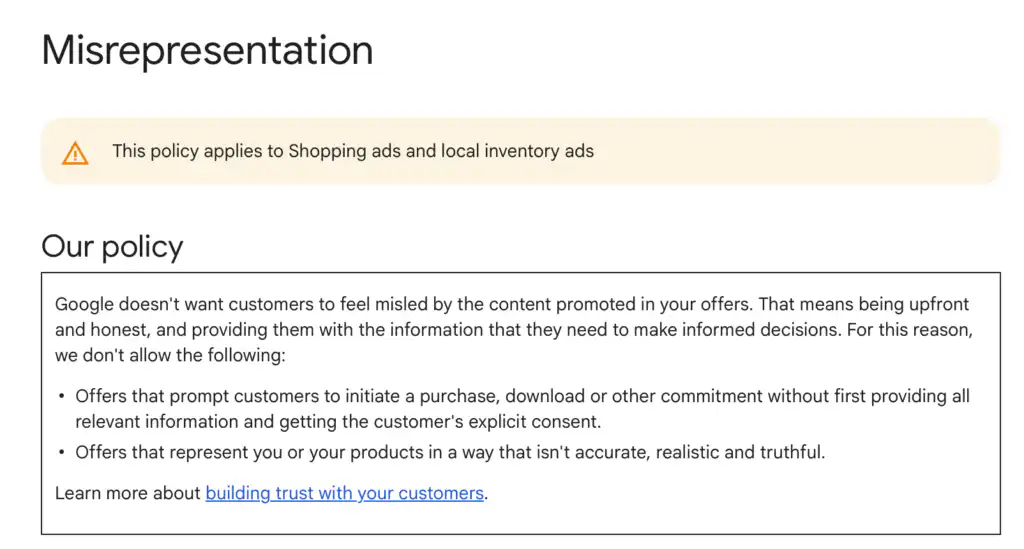
Additionally, your Google Merchant Center account must be fully optimized according to Google’s requirements — providing accurate and transparent business details, clear return and shipping policies, contact information, and product data that precisely reflects reality. Otherwise, the system may flag your account for “misrepresentation” (misleading information), which can lead to product disapprovals, account suspension, and your ads being completely blocked from running.
Only after this process is completed can your products be actively used in advertising. Google’s system automatically analyzes this data and, based on users’ search queries, determines which products to display at any given moment.
For example, if a user searches for “white sneakers,” the system evaluates your product catalog data to determine whether your product matches that query. The key thing to understand is that in this model, keywords are no longer the primary control mechanism — product data quality, accuracy, and structure have the greatest impact on performance.
You can read more about Google’s “misrepresentation” policy here: https://support.google.com/merchants/answer/6150127?hl=en-GB
What Is Essential to Prepare Before Launching Shopping Ads?
1. A Well-Structured and Technically Prepared E-commerce Store
Before using Google Shopping Ads, it is essential to ensure that your e-commerce store is not only technically prepared but also fully compatible with Google Merchant Center integration. Google evaluates not just the advertisement itself, but the entire user experience, meaning your website must meet the highest standards:
- Mandatory HTTPS (SSL certificate) – Without it, your account will not even be approved.
- Full mobile optimization – The majority of traffic comes from mobile devices, so poor mobile performance directly reduces results.
- Fast page load speed – Even a few seconds of delay can significantly decrease conversion rates.
- Clean and non-disruptive user experience – Avoid aggressive pop-ups or any elements that make browsing difficult.
Simply put, if the shopping experience is inconvenient for users, your ads will not perform effectively — even if the technical campaign setup itself is flawless.
2. Product Catalog Preparation (Product Feed)
This is one of the most critical components of Google Shopping Ads because Google relies on your product catalog to “understand” what you are selling, who to show it to, and how often. Even a technically flawless website will fail to deliver strong results if your product feed is disorganized or incomplete.
Key aspects:
- Product Titles – Must be clear, informative, and aligned with search intent (e.g., “Nike Air Zoom Pegasus 40 Women’s Running Shoes” instead of simply “Sports Shoes”).
- Descriptions – Should complement the title, include important keywords, and clearly describe the product.
- High-Quality Images – No watermarks, text overlays, or borders; the product should be clearly centered. Visual quality directly impacts CTR (click-through rate).
- Accurate Categories and Attributes – Google Product Category, brand, GTIN, size, color, and other attributes help Google’s algorithm better understand and match your products.
- Pricing and Availability – Must be constantly updated and synchronized with your website in real time.
- Feed Structure and Format – Must meet Google Merchant Center requirements (XML, CSV, or API integration).
It is important to understand that a product feed is not a “one-time setup.” It is an ongoing optimization asset — refining titles, testing structures, and improving data quality can significantly enhance ad performance without increasing your advertising budget.
3. Completely Transparent Pricing
The price displayed in your ad must be identical to the price the user sees after clicking on the product. There can be no hidden fees, unexpected additional costs during checkout, or pricing discrepancies across different pages. Google automatically monitors this data, meaning even minor inconsistencies can lead to product disapprovals or full account suspension. In this system, transparency is not an advantage — it is a mandatory requirement.
It is important to understand that this applies not only to pricing, but to all product information, including availability (whether the item is actually in stock), promotions, shipping costs, and delivery times. If one offer is shown in the ad but the user encounters something different on the website, Google may classify this as misleading behavior.
Additionally, pricing must be continuously updated within your product feed and synchronized with your website in real time, especially during sales campaigns or promotional periods.
Ultimately, Google’s goal is to protect consumer trust, so any inconsistency between advertising and real customer experience can result not only in technical consequences (such as product disapprovals), but also strategic ones — reduced visibility, lower performance, or even account suspension.
4. A Smooth and Fully Functional Purchase System
Before investing in traffic, it is essential to fully test the entire purchasing process — from product selection to final payment. All payment methods must function flawlessly, with no technical issues, broken steps, or interruptions.
The checkout process should be simple, clear, and as short as possible. Every unnecessary step or technical error at this stage directly costs money, as users who were already ready to purchase may abandon the process and never return.
5. Clear Shipping and Return Policies
This is one of the most critical trust factors for both consumers and Google’s system. Shipping information must be accurate and consistent, including clear pricing (for example, if you state €4.99, it must be identical everywhere), realistic delivery timeframes, and specific shipping methods.
A practical recommendation: it is better to promise slightly longer delivery times and exceed expectations than to create customer disappointment.
Your return policy must also be clearly defined, including:
- How long customers have to return products
- Who covers return shipping costs
- What return conditions apply
It must fully comply with EU regulations (such as the mandatory 14-day return period). All of this information must be fully aligned between your website and Google Merchant Center.
6. Contact Information and Trust
Google places strong emphasis on business transparency, making it essential to clearly display your contact information. It is recommended to provide at least two of the following:
- Email address
- Phone number
- Physical business address
This information should be easy to find and presented in plain text (not hidden behind forms or buried on obscure pages).
Clear contact details not only help meet Google’s platform requirements, but also strengthen consumer trust — a factor that directly impacts conversion rates.
7. Physical Products Only
Shopping Ads are designed exclusively for physical products, so it is important to evaluate your offering accordingly. Services, digital products, subscriptions, or consulting cannot be promoted through this channel.
A simple rule: if the product can be physically packaged and shipped to a customer, it is eligible for Shopping Ads. If not, alternative advertising solutions should be considered.
Google Shopping Ads reklamos klaidos
One of the biggest mistakes businesses make with Shopping Ads is assuming that performance depends solely on campaign settings. In reality, the greatest losses usually stem not from campaign management itself, but from foundational technical and data-quality issues that companies often underestimate.
One of the most critical problems is pricing or inventory mismatches between Google Merchant Center and the website. Even minor discrepancies can lead to product disapprovals, and repeated issues may result in full account suspension. This not only stops advertising performance but also damages consumer trust.
Equally important is the product feed — the very foundation of Shopping Ads. If feed quality is poor, the entire campaign suffers. Common issues include:
- Low-quality or poorly optimized product titles
- Descriptions lacking important keywords
- Inappropriate or low-quality images
- Incorrect product categorization
- Missing key attributes such as size, color, or brand
These deficiencies limit Google’s ability to properly understand and match your products to relevant audiences, reducing both visibility and conversion potential.
Additionally, the post-click user experience plays a critical role. If the price or offer shown in the ad differs from what users find on the website, or if shipping conditions are unclear, unexpected, or hidden, conversion rates drop significantly. Google also requires transparent shipping information, including pricing, delivery times, and conditions.
The same applies to return policies — if they are unclear, difficult to find, or non-compliant, this can reduce trust and trigger Merchant Center warnings or restrictions.
Mobile experience must not be overlooked either. Since the majority of Shopping Ads traffic comes from mobile devices, slow-loading pages, poor mobile optimization, or complicated checkout processes directly reduce conversion rates, regardless of how well the ad campaign itself is configured.
Another frequently ignored but highly important area is compliance with Google’s policies. Mistakes such as:
- Misrepresentation (misleading product or business information)
- Unavailable promotions (offers that do not match reality)
- Advertising prohibited products
- Consistently ignoring feed errors
can lead to severe consequences ranging from individual product disapprovals to complete account suspension.
Ultimately, the most important thing to understand is that Shopping Ads is not traditional advertising — it is a data-driven system. If your data is inaccurate, incomplete, or poorly optimized, even the best-configured campaigns will fail to deliver strong results.
For this reason, most Shopping Ads problems are caused not by advertising strategy or budget limitations, but by poor data quality. True Shopping Ads success begins not in Ads Manager, but with a clean, optimized, and continuously maintained product feed, supported by a transparent, user-friendly website.
Product Data Management Tools — An Essential Priority
For business leaders aiming not only to technically launch Google Shopping Ads campaigns but also to transform this channel into a long-term growth engine, the most important realization is that true success does not lie in the launch itself.
The greatest results are created through data quality, strategic profitability management, pricing competitiveness, and continuous optimization. Google Shopping Ads is not a traditional advertising channel that can simply be activated and left to operate on autopilot. Instead, it functions as a complex business growth infrastructure where advertising, data, pricing, logistics, and profit margins work together as one integrated system.
For this reason, executives must view this channel not simply as another marketing function, but as a strategic profitability management mechanism capable of driving sustainable long-term business growth.
Advanced Product Data (Feed) Management — The Foundation of Business Control
One of the most important steps in this process is advanced product data (feed) management. Tools such as Channable, DataFeedWatch, Productsup, and Feedonomics allow marketing teams to independently manage product data without requiring constant developer involvement. This means teams can quickly adjust product titles, optimize attributes, apply SEO principles, manage seasonality, or even automatically pause advertising for specific products based on predefined rules — for example, when inventory levels become too low or when product profitability declines.
This level of flexibility not only saves time, but also gives businesses the ability to respond rapidly to market changes, maintain competitiveness, and exercise far greater control over overall advertising performance.
Additionally, it is highly recommended to use custom labels within your product feed to segment products based on factors such as profit margin, seasonality, bestseller status, or price competitiveness. This structure allows advertising campaigns to be managed according to real business priorities rather than solely focusing on overall sales volume.
If you represent an e-commerce business, we also recommend reading: E-commerce Black Friday Mistakes That Kill Sales and A Limited Marketing Budget Is Not a Problem If You Know How to Allocate It Wisely
FAQ
What Are Google Shopping Ads and How Do They Differ from Traditional Google Ads?
Google Shopping Ads are visual product advertisements that display a product image, price, seller, and other essential information directly within Google search results before the user even clicks. Unlike traditional text-based ads, they are primarily driven by product data rather than keyword-focused ad copy.
When Will Google Shopping Ads Officially Launch in Lithuania?
According to Google’s expansion plan, Lithuania is included in the second rollout phase, which is strategically aligned with the holiday season — one of the most important retail periods of the year.
Why Is It Important for Lithuanian E-commerce Businesses to Prepare in Advance?
Early preparation ensures a properly structured Google Merchant Center account, an optimized product feed, strong technical website readiness, and a competitive advantage over market players who begin preparing too late.
What Is Google Merchant Center?
Google Merchant Center is the platform where your product catalog (feed) is stored and managed for Shopping Ads campaigns. Without a Merchant Center account, Google Shopping Ads cannot function.
Can I Use Shopping Ads Without Google Merchant Center?
No. Google Merchant Center is essential infrastructure, as it is the primary source Google uses to access your product data for Shopping Ads delivery.
What Types of Products Can Be Advertised Through Google Shopping Ads?
Only physical products are eligible. Services, digital products, consultations, and subscription-based offerings are not suitable for this advertising format.
What Are the Main Technical Requirements for an E-commerce Store?
- HTTPS/SSL certificate
- Mobile-optimized website
- Fast page performance
- Clear navigation
- Fully functional checkout process
- Transparent contact, shipping, and return information
What Is a Product Feed?
It is a structured product catalog that contains product titles, prices, images, categories, GTIN codes, brand information, stock availability, and other essential product data.
Why Is Product Feed Quality So Important?
Google’s algorithms rely heavily on product feed quality to determine when, to whom, and how often your products should be shown. A well-optimized feed directly improves click-through rates (CTR) and conversion performance.
What Are the Most Common Google Shopping Ads Mistakes?
- Pricing discrepancies between ads and website
- Poorly optimized product titles
- Low-quality product images
- Missing product attributes
- Slow-loading pages
- Unclear return or shipping policies
- Violations of Google policies (such as misrepresentation)
What Is “Misrepresentation” in the Context of Google Shopping Ads and Why Is It Dangerous?
It is a violation of Google’s policies that occurs when a business provides misleading or inaccurate information about its products, pricing, or business operations. This can result in account suspension.
Are Google Shopping Ads Suitable for Smaller Businesses?
Yes, but smaller businesses must be exceptionally well-prepared both technically and strategically, as competition is expected to be highly intense.
Does Having the Largest Budget Guarantee Success in Google Shopping Ads?
No. Success with Shopping Ads is often determined less by advertising budget and more by data quality, pricing competitiveness, product feed optimization, and overall user experience.
What Tools Help Manage Product Feeds?
The most popular options include:
- Channable
- DataFeedWatch
- Productsup
- Feedonomics
Can Google Shopping Ads Be Automated?
Yes. Google Shopping Ads integrates seamlessly with Performance Max campaigns, allowing businesses to automate optimization, improve performance through data-driven decision-making, and scale results more efficiently.
Will Google Shopping Ads Impact SEO Results?
Yes. Since Shopping Ads often occupy the most prominent positions above organic search results, they can reduce the visibility of organic traffic and significantly influence user click behavior.
Will Google Shopping Ads Affect SEO Results?
Yes, because Shopping Ads often appear in the highest positions above organic search results, which can reduce the visibility of organic traffic.